Operating System Basics
What is an OS?
The Operating System
- Event-driven program that manages the hardware state.
- Acts as a bridge between applications and hardware.
- The Kernel:
- User Space:
- Where your applications run.
- Runs in Restricted Mode (User Mode). :)
Abstraction
Problem: Raw hardware interfaces (registers, disk controllers) are complex and inconsistent.
[!check] Solution: System Calls
Arbitration / Resource Management
Problem: Resources (CPU cycles, RAM, I/O) are finite; multiple programs
want them simultaneously.
[!check] Solution: Multiplexing
- Time Multiplexing: Scheduling different processes on the CPU over time.
- Space Multiplexing: dividing RAM and Disk space among processes and users.
- Isolation: Ensuring a bug in Process A does not crash or starve Process B.
Key Functionalities
Process Management (Scheduling)
- Program vs. Process:
- “Program”: Static instructions on disk.
- “Process”: A program in execution (loaded into RAM with a specific program counter, stack pointer, and registers).
- Context Switching:
- The OS halts the current process.
- Saves the CPU register state to a Process Control Block (PCB) in RAM.
- Loads the saved state of the next process.
- Result: The illusion of parallelism on a single core.
Memory Management (Virtualization)
- The OS provides the abstraction of Virtual Memory.
- Address Spaces: Every process believes it has access to a contiguous map of memory (e.g., 0x0000 to 0xFFFF).
- Translation: The OS + Hardware (MMU) map virtual addresses to physical RAM addresses.
- Basically, what process_1 calls “memory 0x0001”, it might be mapped to like 0x0251 or something in actual memory, and what process_1 sees as “memory 0x0002” might actually be mapped to 0x0571 etc.
- Basically, they just get like block 1, block 2, block 3 etc. which are mapped and spread out across the whole memory.
- Protection:
- Process A cannot access Process B’s physical memory pages (or segments).
- A user process cannot access Kernel memory.
- “Segfault” (segmentation fault): Occurs when a process tries to access an address that has no mapping to a physical address.
I/O and Interrupt Management
Architecture context: I/O can be millions of times slower than a CPU cycle. We cannot use busy-waiting.
- Request🫴: User program requests I/O (System Call).
- Sleep😴: OS puts the process in a “Waiting” state and yields the CPU to another process.
- Interrupt🫸: When hardware is ready, it sends an electrical signal (Interrupt) to the CPU.
- ISR (Interrupt Service Routine) 🚫: CPU jumps to the OS’s Interrupt Service Routine (essentially a function in the Kernel).
- Wake😱: OS moves the original process back to the “Ready” queue.
File Systems📂 / Storage Abstraction
- Physical View: A hard drive is an array of millions of generic blocks (sectors).
- Logical View: The OS creates the concept of Files, Directories, and Paths.
- Responsibility:
- Mapping filenames to physical block addresses.
- Managing metadata (permissions, timestamps).
- ensuring consistency (journaling) in case of power loss.
Protection🛡️ (Ring 0 vs Ring 3)
Hardware architectures (like x86) support privilege levels.
In practice, only these 2 rings are used:
Ring 0 (Kernel Mode)
- Full access to all hardware instructions.
- Can manipulate memory maps and disable interrupts.
Ring 3 (User Mode)
- Restricted subset of instructions.
- Cannot directly access hardware.
Traps: If user code attempts a privileged instruction, the CPU hardware “traps” the attempt and hands control to the OS to handle the violation (usually by killing the process).
Common Operating Systems
Unix / Linux
Origins: Developed at AT&T Bell Labs (late 60s).
The Unix Philosophy “Everything is a file.”
- Hardware, sockets, and data are accessed via file descriptors.
- Focus on small, modular tools piped together.
Linux 🐧:
- Technically just the Kernel (Linus Torvalds, 1991).
- He used to work with MS-DOS (Microsoft), but he didn’t like that it wasn’t open-source.
- Distro (short for “distribution”): Kernel + GNU Tools + Package Manager + Desktop.
- Architecture: Monolithic Kernel (drivers in Kernel space). macOS 🍎:
- Based on the Darwin Kernel (Hybrid XNU Kernel: Mach Unix + BSD Unix).
- It is POSIX compliant (i.e. compatible with standard Unix APIs).
Windows 🪟 (compared to Unix)
Slightly different to Linux.
- Architecture: Hybrid Kernel
- Configuration: The Registry
- Unix: Uses text files (e.g.,
/etc/config). Most configuration is done via plain text files.- Pros: Simple, easy to back up/restore.
- Cons: Slower access, scattered management.
- Windows: Uses a centralized hierarchical database (The Registry). So all configuration settings are stored in one place.
- Pros: Faster access, centralized management.
- Cons: More complex, harder to back up/restore.
- Unix: Uses text files (e.g.,
- Resource Model:
- Unix: Everything is a file (including devices, sockets).
- Windows: Uses Objects (files, devices, processes) managed by the Object Manager.
- Resources are treated as abstract Objects managed via Handles (references). Side note: Windows since XP is based on the Windows NT architecture which is what we mostly mean these days, unlike Windows 95, 98, ME which were based on MS-DOS.
Android 🤖📱
Often misunderstood as “Just Linux.” It uses the Linux Kernel, but the user-space is unique.
It is the most deployed OS in the world (billions of devices). Because unlike iOS, Android is open-source and used by many manufacturers, not just for phones but also tablets, TVs, cars, etc.
The Android Stack
- Top: Android Runtime (ART). Apps compile to Bytecode (DEX), not native machine code. So each app runs in its own instance of the ART VM (like Java).
- Middle: Native Libraries & Hardware Abstraction Layer (HAL). So things like OpenGL, SQLite, Media codecs, etc.
- Bottom: Linux Kernel (Memory, Scheduling, Drivers). So all the low-level stuff is handled by the Linux Kernel.
Key Mechanism: Binder IPC
- Apps are strictly sandboxed (security).
- They communicate via Binder (Inter-Process Communication) to talk to the OS or other apps. Which means that apps can’t directly access each other’s memory or data.
Embedded and RTOS (Real-Time Operating Systems)
There are many other kinds of operating systems designed for specific use-cases, especially in embedded systems (IoT (Internet of Things) devices, automotive systems, industrial machines).
General Purpose OS (Windows/Linux) Goal: Throughput. RTOS Goal: Determinism / Consistency.
- RTOS (Real-Time Operating System):
- Examples: FreeRTOS, VxWorks, QNX.
- Hard Real-Time: A delayed calculation is a system failure (e.g., car brakes, pacemaker).
- Features: Tiny kernels, fast interrupt handling, often no virtual memory (to avoid paging latency).
- Embedded Linux:
- Standard Linux stripped down (e.g., Raspberry Pi).
- Used when complex networking or GUIs are needed, but strict microsecond-timing isn’t required.
What is POSIX?
POSIX = Portable Operating System Interface (the X is for Unix).
The Concept: An API Contract POSIX is an IEEE (Institute of Electrical and Electronics Engineers) standard that defines an interface between User Space applications and the OS Kernel.
The Motivation (The “Unix Wars”)
- In the 80s, Unix fragmented (BSD, System V, etc.). Code written for one Linux machine wouldn’t compile on another.
- Goal: Source code portability. A C program written using POSIX standards will compile on Linux, macOS, and BSD without changes (mostly).
Components and Adoption
What does POSIX actually define?
- System Call APIs (C Headers):
- File I/O:
open(),read(),write()(vs WindowsCreateFile). - Process Control:
fork(),exec(),wait(). - Threading:
pthreads(<pthread.h>).
- File I/O:
- Shell & Utilities:
- Standardizes behavior of CLI tools (
ls,grep,awk) so scripts are portable. Who is Compliant?
- Standardizes behavior of CLI tools (
| OS | Status |
|---|---|
| macOS | Certified. Actually fully POSIX compliant. |
| Linux | De Facto. Mostly compliant, but people rarely pay for the certification. |
| Windows | No. Uses Win32 API. Needs WSL (Subsystem for Linux). |
So if they’re POSIX compliant, that means they support the same system calls and APIs, making it easier for developers to write cross-platform applications.
Operating Systems and Security
The OS and the Trusted Computing Base
[!definition] Trusted Computing Base (TCB) “... is the totality of protection mechanisms within a computer system – including hardware, firmware, and software – that is responsible for enforcing a security policy. TCB is all components that must work correctly for the system to be secure. If any part is broken, the security of the entire system is broken.”
The Reference Monitor
The OS acts as a gatekeeper between Subjects (Users, Processes) and Objects (Files, Hardware).
Every system call (e.g., open()) is intercepted to check:
1. Authentication: Who are you?
2. Authorization: Are you allowed to do this?
Authentication: “Who are you?”
Identification vs. Verification
- Identification: Claiming an identity (Username).
- Verification: Proving it (Password, Biometric, Key).
Secure Storage (Hashing)
- Rule #1: The OS never stores passwords in plain text.
- Hashing: The OS stores a cryptographic hash (e.g., SHA-256) of the password.
- On login:
InputHash = Hash(UserInput). - If
InputHash == StoredHash, access is granted.
- On login:
- Salting 🧂:
- To prevent “Rainbow Table” attacks (pre-computed hash databases), the OS adds a random string (salt) before hashing.
- This ensures that even if two users have the same password, their stored hashes differ.
StoredValue = Hash(Password + Salt).
- To prevent “Rainbow Table” attacks (pre-computed hash databases), the OS adds a random string (salt) before hashing.
Access Control:”What can you do?”
Once authenticated, the OS uses a User ID (UID) to enforce permissions.
- DAC (Discretionary Access Control):
- The Owner of the file decides permissions.
- Example: Linux
chmod. You can make your file readable by everyone. - Risk: Malware running as “You” can change your file permissions.
- MAC (Mandatory Access Control):
- The System Policy decides permissions. Users cannot override this.
- Used in High Security (SELinux) and Mobile (iOS/Android).
- Example: A web-server process cannot read the
/homedirectory, even if run by root.
The Principle of Least Privilege
Golden Rule of OS Architecture A process should only have the absolute minimum privileges necessary to do its job.
Why?
- It limits the “Blast Radius.”
- If a calculator app is hacked, it shouldn’t have permission to read the network driver or Kernel memory.
- This is enforced via CPU modes (User Mode vs. Kernel Mode).
- (Also: modern OSes use techniques like Sandboxing and Containers to isolate applications further.)
System Logs
The “Flight Recorder” of the OS.
- What: High-level textual records of events.
- Content: (Failed) logins, sudo usage, Service crashes.
- Locations (where they live):
- Linux:
/var/log/syslog,/var/log/auth.logvar/log/syslog: General system messages, including system errors, informational messages, and warnings.var/log/auth.log: Authentication-related events, such as login attempts and sudo usage.
- macOS:
/var/log/system.log - Windows: Event Viewer
- Linux:
- Forensics: The first place admins look after a breach. Beyond real-time monitoring, logs provide a historical record to trace back an attacker’s actions.
- But beware: attackers may try to delete or alter logs to cover their tracks. Hence, secure log management practices are essential.
File Integrity & System Auditing
Going deeper than standard logs:
- System Auditing (Kernel Level):
- Hooks into the Kernel to track System Calls.
- Example: Not just “User logged in”, but “Process 402 attempted
open()on/etc/shadowand was denied.” - Required for strict compliance to various standards (PCI-DSS, HIPAA).
- File Integrity Monitoring (FIM):
- Threat: Attackers replacing system binaries (like
/bin/login) with Trojan horses. - Defense: Calculate checksums (hashes) of critical files.
- If the hash of /bin/login changes, the OS triggers an alarm immediately.
- Threat: Attackers replacing system binaries (like
We’ll be doing this in today’s lab!
Enable System Auditing
Enable System Auditing: Windows🪟
System Auditing is a granular policy managed via the Local Security Policy tool.
- GUI Method:
- Run secpol.msc as Administrator.
- Navigate to: Local Policies → Audit Policy.
- Double-click a category (e.g.,”Audit logon events” or”Audit object access”).
- Check Success (log when it works) and/or Failure (log when it is denied).
- Command Line Method (PowerShell/CMD): Using the
auditpoltool.
Example Command
Logs are viewed in the Event Viewer or using Get-EventLog in PowerShell.
Enable System Auditing: Linux🐧
Linux uses the Linux Audit Framework. It listens to the Kernel for specific system calls and file changes.
Installation:
- Install:
sudo apt install auditd(Debian/Ubuntu) oryum install audit(RHEL/CentOS). - Start:
sudo systemctl start auditd. - Defining Rules: You use
auditctlto add rules to the Kernel in real-time.
[!example] Example: Watch for changes to passwords
bash
$ sudo auditctl -w /etc/shadow -p wa -k password-change
-w: Watch this file path.-p wa: Trigger on write or attribute change.-k: Tag log entries with a search key.
Logs are stored in /var/log/audit/audit.log, queried via ausearch or aureport.
Enable System Auditing: macOS🍎
macOS uses the Basic Security Module (BSM), an advanced auditing system derived from TrustedBSD.
- Configuration:
- Config file is located at
/etc/security/audit control. - Controls”flags” for events (e.g., lo for login, ad for administrative actions).
- Config file is located at
- Activation: The audit daemon (
auditd) usually runs by default. To reload configuration changes:$ sudo audit -s - Binary Logs: Unlike Linux, macOS audit logs are binary (to prevent tampering). You cannot read them with cat.
[!info] Viewing Logs Use the praudit tool to parse the binary log to text:
Common Vulnerabilities and Exploits
Memory Safety: Buffer Overflows
Stems from the C/C++ programming languages allowing direct memory manipulation without bounds checking. So if you allocate a buffer of size 10, and write 20 bytes into it, the extra 10 bytes will overflow into adjacent memory.
- The Flaw:
- A program allocates a fixed buffer.
- The OS/Program fails to check input size, allowing writes past the buffer end.
- The Exploit (Stack Smashing):
- The attacker overflows the stack to overwrite the Return Address.
- CPU jumps to malicious code (shellcode) instead of returning to the main function.
- Mitigation:
- ASLR (Address Space Layout Randomization): Randomizes memory layout so addresses are hard to guess.
- DEP/NX (Data Execution Prevention / No Execute): Marks stack memory as “Non-Executable.”
Race Conditions
[!example] Example: TOCTOU (Time-of-Check to Time-of-Use) Because OSes multitask, a gap exists between checking the file permissions and using it.
A research task we have today is how to mitigate and prevent these.
Command Injection 💉
Occurs when the Shell is tricked into executing unintended commands.
- The Flaw: Passing unsanitized user input directly to a system command.
- The Exploit:
- Script expects a filename:
rm $filename - Attacker inputs:
file.txt; rm -rf / - The OS interprets ; as a command separator and executes both.
- Script expects a filename:
Privilege Escalation
The attacker’s goal: Move from Ring 3 (User) to Ring 0 (Kernel).
- Vertical Escalation:
- Exploiting bugs in “SetUID” programs (programs that run as root, like
sudoorpasswd).
- Exploiting bugs in “SetUID” programs (programs that run as root, like
- Kernel Exploits:
- Crashing or manipulating the Kernel itself.
- Weak Link: Third-party Drivers. They run with full privileges but often have less rigorous code quality than the core kernel.
Rootkits and Zero-Days
Rootkits
- Malware that modifies the system to hide its own existence.
- e.g., by just diverting or intercepting system calls.
- Essentially, it’s malware that’s designed to be stealthy and avoid detection by traditional security measures. It gets the Operating System to lie to the user or security software about what’s really happening on the system.
- Example: When you run
lsorps, the rootkit filters the output of the underlying system calls to hide the hacker’s files and processes. The OS lies to the user. - Defense: Use trusted boot mechanisms and integrity checks to detect unauthorized changes to system binaries.
Zero-Day Vulnerabilities
- A flaw known to the attacker but unknown to the vendor (0 days to fix).
- Defense: “Defense in Depth”. You cannot patch it, so you must rely on firewalls, strict access control, procedures, etc. to contain it.
Commands for Sysadmins
| Action | Linux Command | PowerShell / Windows |
|---|---|---|
| Execute asroot / Admin | sudo [cmd] |
Start-Process -Verb RunAs(Or open Terminal asAdmin) |
| Change FilePermissions | chmod 755 file |
icacls file /grant...(Or Set-Acl) |
| View Permissions | ls -l |
icacls [file](Or Get-Acl) |
| Change Ownership | chown user file |
takeown /f file(Or Set-Acl) |
| Change Password | passwd |
Set-LocalUser |
ls -l access modifiers and their meanings:
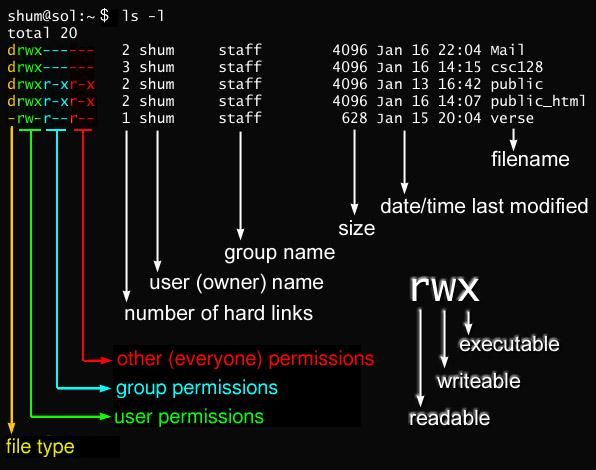
File Permissions: Linux vs. Windows
Linux (POSIX Model)
- Simple Structure: Permissions apply to three rigid categories:
- User (Owner)
- Group
- Others (World)
- The Bits: Read (
r), Write (w), Execute (x). - Representation: often represented symbolically (
rwxr-xr-x) or with a 3-digit octal (base-8) number (755). (rwxr-xr-x=7(rwx)5(r-x)5(r-x)) - Example:
chmod 755 file.txtmeans:- Owner: Read, Write, Execute
- Group: Read, Execute
- Others: Read, Execute
Windows (ACL (Access Control List) Model)
- Complex Structure: Uses Access Control Lists (ACLs).
- Granular: You can assign distinct permissions to 50 different users individually.
- Inheritance: Files heavily inherit rules from parent folders.
- The Rights: Full Control, Modify, Read & Execute, List, Read, Write.
Everything is a file, the directory is a file. (This applies to Linux/Unix systems. With Windows, it’s a bit different as it uses objects and handles, but the concept of files and directories still exists.)
Advanced Permissions: SUID & SGID
Concept: SUID (Set User ID) allows a user to execute a file with the permissions of the file owner, rather than their own.
Use Case: passwd
- Problem: Standard users cannot write to the password database (
/etc/shadow). - Solution: The
passwdbinary is owned by root and has SUID set. - Result: When run, the process promotes to root temporarily to save changes.
Danger
- SUID is a major vector for Privilege Escalation.
- If an SUID root binary has a bug (e.g., buffer overflow), an attacker can exploit it to gain a Root Shell.
- Attackers scan for these immediately:
find / -perm -4000
Command: chmod u+s file
Indicator: -rwsr-xr-x 1 root root 64152 maí 30 2024 /usr/bin/passwd
Process & Service Management
| Action | Linux Command | PowerShell / Windows | |
|---|---|---|---|
| Start/StopServices | systemctl start [svc] |
Start-Service [svc](Get-, Stop-, Set-) |
|
| List Pro-cesses(Snapshot) | ps aux |
Get-Process |
|
| Real-time | top / htop |
Get-Process \\ | Sort CPU(Or GUI taskmgr) |
|
| Kill Process | kill -9 [PID] |
Stop-Process -Id [PID] |
Disk & File System Management
| Action | Linux Command | PowerShell / Windows | |
|---|---|---|---|
| Free Space | df -h(Disk Free) |
Get-Volume(or Get-PSDrive) |
|
| Disk Usage | du -sh [folder] |
gci -Recurse \\ | Measure -Property Length -Sum |
|
| Search | find /path -name x |
Get-ChildItem -Recurse -Filter "x" |
|
| Archive | tar -czvf x.tar.gz(or zip, rar, etc) |
Compress-Archive(Win10+ has tar.exe) |
Logs
| Action | Linux Command | PowerShell / Windows | ||
|---|---|---|---|---|
| Followchanges live | tail -f log.txt |
Get-Content log.txt -Wait(Alias: cat -Wait) |
||
| Search | grep "Error" |
Select-String "Error"(Alias: sls) |
||
| … or both | tail -f log.txt \\ | grep "Error" |
Get-Content log.txt -Wait \\ | Select-String "Error" |
Scheduling & Maintenance
| Action | Linux Command | PowerShell / Windows |
|---|---|---|
| ScheduleTasks | crontab -e(opens the cron table in aneditor) |
Register-ScheduledTask |
| Install Updates | apt update && apt upgrade(Depending on Distro) |
winget upgrade --all(Only for apps, not the OS itself!) |
Up Next ..
Further Studies
- Find examples of attacks that used root kits and discuss what role the rootkits played in the attacks.
- Side-Channel Attacks (Meltdown & Spectre): These famous vulnerabilities exploited Speculative Execution in the CPU hardware. How did they allow a User Mode process to read Kernel Mode memory without ever technically triggering a privilege violation?
- DMA (Direct Memory Access) Attacks: Peripheral devices (like a GPU or Network Card) use DMA to access RAM without asking the CPU. How can a malicious device (e.g., a compromised USB drive) use DMA to read system memory, bypassing the OS entirely?
- Which mitigation means exist to avoid the problem of SUID opening the system up for privilege escalation attacks?
Lab today and Guest Lecture tomorrow
- Lab 4: Use auditing (turn it on!) to find ”malicious” processes modifying the file system.
- Guest Lecture tomorrow by Giovanni Apruzzese on Phishing.
Day before the exam will be a recap lecture.
Exam (Friday, 12th of December) will be later in the day? Around noon or later?
Knowledge base in the exam: we might just get a print-out. It shouldn’t be too big.